
Read More

bladeRF now supports SDR-Radio, and headless mode (FPGA auto-loading)


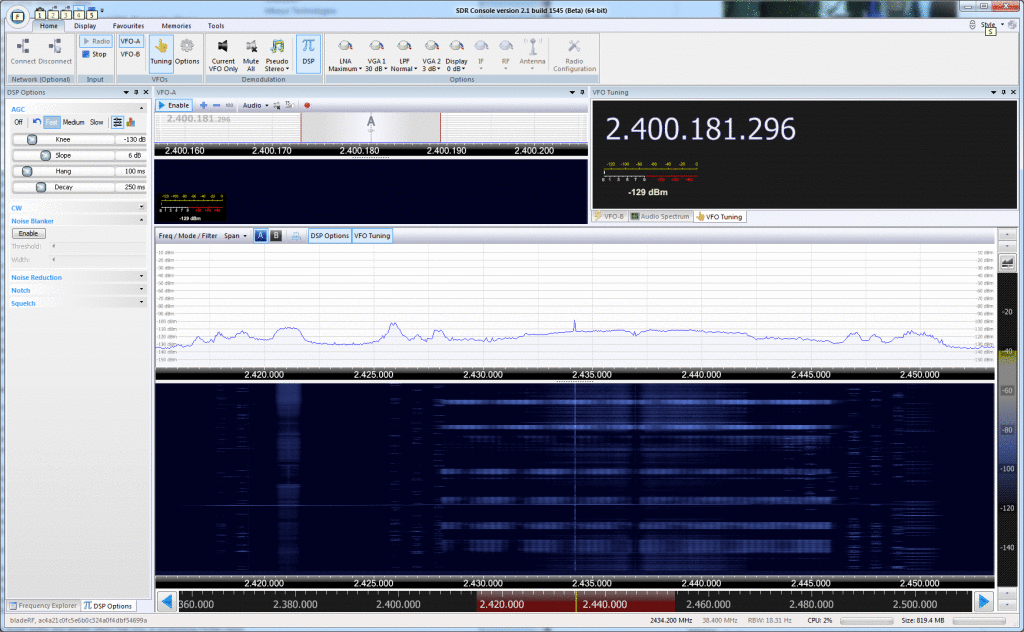
38.4MHz of RF bandwidth at 2.4GHz with SDR-Radio and bladeRF


We have added many new exciting features and improvements to bladeRF in the past couple of weeks. By upgrading to the latest FX3 image ( http://nuand.com/fx3/latest.img ) you can now store FPGA images on the SPI flash by running `bladeRF-cli -L hostedx40.rbf`. This will allow your bladeRF to read an FPGA image from flash and program the FPGA without the need of a host computer. Autoloading was used to get the UAV-SDR operational ( http://www.nuand.com/blog/heading-to-defcon/ )!

Simon Brown of SDR-Radio fame has recently added bladeRF support to SDR-Radio v2.1 (which is still in beta). To download and try out SDR-Radio follow this link: http://v2.sdr-radio.com/Download.aspx . Scrolldown for a screenshot of SDR-Radio looking at 38.4MHz of bandwidth in the 2.4GHz band. A moderately active 802.11 device can be seen at 2.437GHz (which coincides perfectly 802.11 channel 6!). The narrower signals between 2.448GHz and 2.451GHz belong to Bluetooth devices.

Preliminary Matlab support with included instructions can be found at http://nuand.com/downloads/matlab.tar.gz . We will update everyone as soon as a separate git repository is launched to address Matlab support for bladeRF! There is also preliminary support for bladeRF in PyBOMBS now at https://github.com/nuand/pybombs . A quick guide to using PyBOMBS can be found at http://gnuradio.org/redmine/projects/pybombs/wiki/QuickStart , please ensure you clone our git repository when following those instructions.

Lastly, the HF/VHF transverter has undergone multiple architecture revisions, although they all seem to work we have felt like there might be room for a little more performance increase. We have taken into consideration many people’s requests and suggestions about the overall architecture of the transverter on IRC, the forums, and over email. We hope the proposed improvements we have come up with will be well worth the wait. We will present the semi-final block diagram and performance characteristics of the expansion board shortly.

Read More

Platform support update


We have come a long way with our platform support in the past couple of weeks. We have added and tested DC calibration, sped up FPGA programming, added a new bladeRF-flash tool and several streaming examples, and moved most of the API over to asynchronous calls.

To benefit from these changes you must upgrade your device, instructions on upgrading the bladeRF can be at https://github.com/Nuand/bladeRF/wiki/Upgrading-from-v1.0 .

Within the next week we will merge the SPI flash based FPGA loader, which allow the bladeRF to not require a computer to load the FPGA and in effect run headless. Afterwards, our focus will switch to back to merging in timestamped transmissions support, this will enable OpenBTS to run on the bladeRF.

There is now a Windows based installer for the bladeRF that will install all of the relevant drivers, user mode utilities, and FX3/FPGA images. The file can be directly downloaded from http://nuand.com/downloads/bladerf_win_installer.exe .

We would also like to thank the community contributors that have provided patches, and pointed out issues to us. (Bugs and requests for features can be filed via Github athttps://github.com/Nuand/bladeRF/issues/new ).

Lastly, RTucker (HoopyCat) has created an autobuilder for the FX3 and FPGA images. The autobuilder recompiles everything on every commit that is merged into master on Github. The autobuilder can be found at http://hoopycat.com/bladerf_builds/ .


Read More

Platform support


We have spent the last week working on platform support. Windows and Linux installation procedures have been updated and can be found at https://github.com/nuand/bladerf/wiki(OSX installations should flow very similarly to Linux).

We are also trying to debug a SuperSpeed USB3.0 issue that occurs with libusb and certain XHCI controllers. So if at all possible, if you have an ASMedia or Renesas XHCI and are running Windows, could you please tell us via Kickstarter, or email ( [email protected] ) if you bladeRF-cli is able to see the device?

As you might have guessed bladeRF-cli now has interactive support on Windows as well!

There is also another firmware upgrade available (v1.2) that has minor fixes that is avaiable at http://nuand.com/fx3/1.2.img .